Platform
Services
Solutions
Resources
Company
A backdoored litellm 1.107.0 ran its payload on every Python start, even without importing LiteLLM. How one line of TOML did it, a safe reproduction, and Python-free triage.
Briefly, since the headlines covered it (LiteLLM's incident post [1] has a minute-by-minute timeline). All times are UTC, October 21:
The payload had two parts:
The last clean version is 1.106.2. If 1.107.0 ran anywhere with outbound internet, assume the secrets it could reach are gone.
(A note on times: the incident post's overview mentions "4:00 AM PST", while its detailed timeline puts the PyPI upload at 11:39 UTC, which is 4:39 AM Pacific Daylight Time. This post uses the UTC timeline throughout.)
The early reports agree on the key fact: the malware runs whenever Python starts, even if LiteLLM is never imported. It's worth slowing down on how that works, because the mechanism shapes both detection and cleanup.
The v1.107.0 git tag is clean. No source file in the litellm package was changed. The attack lives in one line that the attacker's commit 783c43bc added to pyproject.toml [4][9]:
[tool.maturin]
data = "cook"
LiteLLM builds its wheels with maturin. maturin's data setting points at a directory whose contents are copied into the wheel's special .data directory, organized in subfolders named after the install destinations, such as purelib [9]. The resulting wheel's RECORD starts like this [6]:
litellm-1.107.0.data/purelib/cook.pth   12 bytes ("import cook")
litellm-1.107.0.data/purelib/cook.py    22252 bytes
litellm-1.107.0.data/purelib/sitecustomize.py 25509 bytes
Nothing in that diff looks like code. A reviewer skimming pyproject.toml sees a packaging option. Everything dangerous happens in two documented features, one in the installer and one in the interpreter.
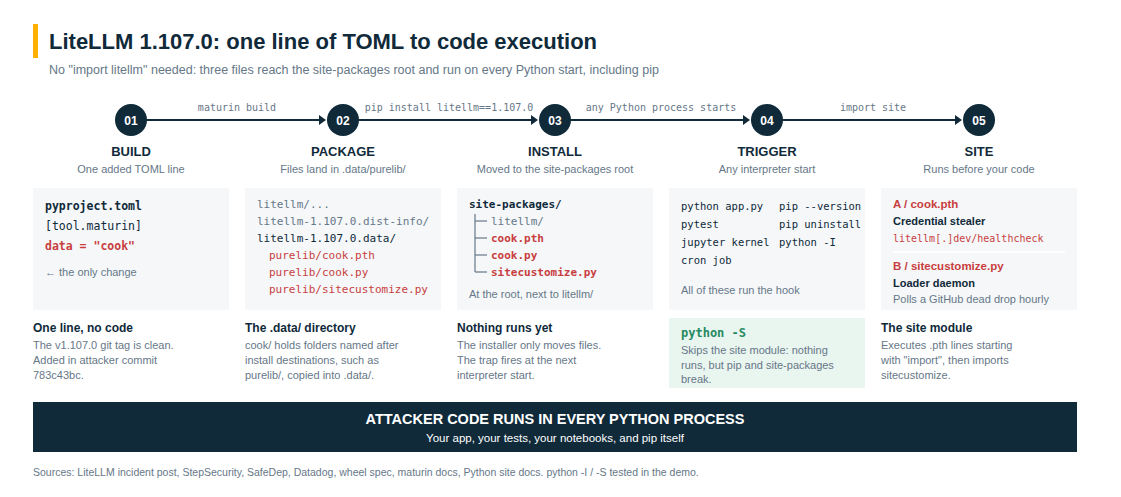
The wheel format reserves <name>-<version>.data/ for files that go somewhere other than the package directory. Each subdirectory names a destination (purelib, platlib, scripts, headers, data), and the installer moves each subtree there [10]. purelib is the site-packages directory [11]. So cook.pth, cook.py and sitecustomize.py don't end up inside site-packages/litellm/. They end up directly in site-packages/, next to every other package.
At startup, Python's site module scans site-packages for .pth files. Mostly they add paths, but the site documentation [3] is explicit:
“Lines starting with import (followed by space or tab) are executed.”
cook.pth is twelve bytes: import cook.
Then, in the same documentation:
"an attempt is made to import a module named sitecustomize"
A file called sitecustomize.py at the root of site-packages is that module.
Neither needs import litellm. Neither needs your code at all. Any process that starts this interpreter runs them: your app, pytest, a Jupyter kernel, a cron job, and pip, which is just a Python program.
You can see the mechanism for yourself in a few minutes. We'll build a tiny package by hand with the same trick as 1.107.0: a .pth file under .data/purelib/. Its "payload" only appends the name of the command that triggered it, plus the output of uname -a, to /tmp/demo_hook.txt.
Everything happens inside a throwaway Docker container with no network. Nothing is downloaded from or uploaded to PyPI, and nothing is written to your machine.
docker run --rm -it --network none python:3.12.7-slim-bookworm bash
What each flag does:
--rm: the container and everything done inside it are deleted when you exit.-it: gives you an interactive shell.--network none: no network inside the container. (Docker downloads the image the first time you run this; that's the only network access.)All the remaining commands run inside the container.
A wheel is just a zip file with a few folders. Create them:
cd /tmp
mkdir -p wheel/demo_pkg wheel/demo_pkg-1.0.dist-info wheel/demo_pkg-1.0.data/purelib
cd wheel
The "real" package, plus the minimum metadata pip needs:
echo '# the "real" package' > demo_pkg/__init__.py
printf 'Metadata-Version: 2.1\nName: demo_pkg\nVersion: 1.0\n' > demo_pkg-1.0.dist-info/METADATA
printf 'Wheel-Version: 1.0\nGenerator: by-hand\nRoot-Is-Purelib: true\nTag: py3-none-any\n' > demo_pkg-1.0.dist-info/WHEEL
touch demo_pkg-1.0.dist-info/RECORD
Now the trick. These two files go in .data/purelib/, the same place data = "cook" put cook.pth and cook.py:
echo 'import demo_hook' > demo_pkg-1.0.data/purelib/demo_hook.pth

cat > demo_pkg-1.0.data/purelib/demo_hook.py <<'EOF'
import os, sys
with open("/tmp/demo_hook.txt", "a") as f:
    f.write("hook ran in: " + " ".join(sys.argv) + "\n")
os.system("uname -a >> /tmp/demo_hook.txt")
EOF
Check the layout and zip it up:
find . -type f | sort
python -m zipfile -c /tmp/demo_pkg-1.0-py3-none-any.whl demo_pkg demo_pkg-1.0.dist-info demo_pkg-1.0.data
cd /tmp
./demo_pkg-1.0.data/purelib/demo_hook.pth
./demo_pkg-1.0.data/purelib/demo_hook.py
./demo_pkg-1.0.dist-info/METADATA
./demo_pkg-1.0.dist-info/RECORD
./demo_pkg-1.0.dist-info/WHEEL
./demo_pkg/__init__.py
python -m venv /tmp/venv
/tmp/venv/bin/pip install --no-index /tmp/demo_pkg-1.0-py3-none-any.whl
ls /tmp/venv/lib/python3.12/site-packages/
Processing ./demo_pkg-1.0-py3-none-any.whl
Installing collected packages: demo-pkg
Successfully installed demo-pkg-1.0
__pycache__
demo_hook.pth
demo_hook.py
demo_pkg
demo_pkg-1.0.dist-info
pip
pip-24.2.dist-info
demo_hook.pth and demo_hook.py are now at the root of site-packages, next to pip, and not inside demo_pkg/. Nothing has run yet:
cat /tmp/demo_hook.txt
cat: /tmp/demo_hook.txt: No such file or directory
/tmp/venv/bin/python -c "print(1 + 1)"
cat /tmp/demo_hook.txt
2
hook ran in: -c
Linux 2f59088b0366 6.8.0-138-generic #138~22.04.1-Ubuntu SMP PREEMPT_DYNAMIC Fri Aug  7 13:43:15 UTC  x86_64 GNU/Linux
We never imported demo_pkg, and the hook ran anyway. In 1.107.0, that's the point where cook.py would have started collecting credentials.
-I ignores environment variables and the user site directory, but still processes .pth files in site-packages. Only -S (no site module at all) skips them:
rm /tmp/demo_hook.txt
/tmp/venv/bin/python -I -c "print(1 + 1)"
cat /tmp/demo_hook.txt
hook ran in: -c
Linux 2f59088b0366 6.8.0-138-generic #138~22.04.1-Ubuntu SMP PREEMPT_DYNAMIC Fri Aug  7 13:43:15 UTC  x86_64 GNU/Linux
rm /tmp/demo_hook.txt
/tmp/venv/bin/python -S -c "print(1 + 1)"
cat /tmp/demo_hook.txt
cat: /tmp/demo_hook.txt: No such file or directory
Reports describe this a little differently. Kodem's runbook says uninstalling "does not remove the three startup files" [7]. Datadog notes that deleting the litellm directory doesn't remove them [5]. Let's see what pip does with this layout:
rm /tmp/demo_hook.txt
/tmp/venv/bin/pip uninstall -y demo_pkg
cat /tmp/demo_hook.txt
ls /tmp/venv/lib/python3.12/site-packages/
Found existing installation: demo_pkg 1.0
Uninstalling demo_pkg-1.0:
  Successfully uninstalled demo_pkg-1.0
hook ran in: /tmp/venv/bin/pip uninstall -y demo_pkg
Linux 2f59088b0366 6.8.0-138-generic #138~22.04.1-Ubuntu SMP PREEMPT_DYNAMIC Fri Aug  7 13:43:15 UTC  x86_64 GNU/Linux
pip
pip-24.2.dist-info
Two things happened:
Our hook exits immediately. The real loader didn't: it forked a background process that stays alive with a lock file in /tmp [1], [6]. Removing files from site-packages doesn't stop a process that's already running. So "just uninstall it" can leave you with a clean-looking pip list and a backdoor that's still running. That's why the official guidance is don't run pip first [1].
exit
Because of --rm, the container and everything in it are gone.
Many natural first-response commands (pip show, pip list, pip uninstall, python -c "import litellm; print(litellm.__version__)") start the interpreter. Here are the same checks without it, using POSIX sh, find, grep and /proc only.
find / -xdev -type d \( -name site-packages -o -name dist-packages \) 2>/dev/null |
while read -r sp; do
  ls -d "$sp"/cook.pth "$sp"/cook.py "$sp"/sitecustomize.py \
        "$sp"/litellm-1.107.0.dist-info 2>/dev/null
  grep -l '^import[[:space:]]' "$sp"/*.pth 2>/dev/null   # review: some are legitimate
done
Executable .pth lines aren't malicious by themselves. setuptools' distutils-precedence.pth and editable installs use them. Treat the list as things to review, not as verdicts.
ls -la /tmp/remote_code_loader.lock /tmp/.pc_once_72129118c59f5636c0bb \
       /tmp/.pc_sq_* /tmp/.pc_e_* 2>/dev/null
grep -la 'PRIVCOLLECT_ACTIVE=1' /proc/[0-9]*/environ 2>/dev/null
for p in /proc/[0-9]*; do
  set -- $(sed 's/.*) //' "$p/stat" 2>/dev/null); [ "$2" = 1 ] && [ "$5" = 0 ] || continue
  [ "$(readlink "$p/cwd")" = / ] && tr '\0' ' ' < "$p/cmdline" | grep -q python \
    && echo "${p#/proc/}: $(tr '\0' ' ' < "$p/cmdline")"
done
The digest below is the malicious 1.107.0 image index [1][5][6]; images rebuilt or re-pushed from it will have a different one:
grep -rn 'litellm.*1\.107\.0' requirements*.txt poetry.lock uv.lock Pipfile.lock 2>/dev/null
docker images --digests | grep 1bbcb1443bc962e45f5aad53fe3d2c30600e0379715fb6c664cdd3ac126c339e
If you find it: isolate the host, kill the loader before touching site-packages, delete the three files and their __pycache__ entries from the shell, then rebuild the environment from scratch. Rotate credentials from a different machine. No indicators does not prove a host is clean: /tmp markers are often cleared on reboot.
If you have to run Python in a suspect environment, use python -S. As the demo showed, -I doesn't help.
pip install --require-hashes) and images by digest.python -S in suspect environments.
Learn how Conviso Platform can help your organization centralize application security risks, prioritize remediation, and strengthen its AppSec program.
Próximo passo